
CLICKABLE TABLE OF CONTENTS
YOUR WEBSITE
For Future Orders & Sharing
Access your new website to order additional products or manage your monthly subscription. You can also share with others, and receive a thank you check for sharing, upon order placement:
- www.lifewave.com/xxxx (first & last name or company name)
Before you sign in, take a look around to give yourself an idea of what your customers see when they go to your website.
To sign in, click the sign-in button on the top right of screen (next to the cart)
Log into your back office (consistent structure for team):
- Login: xxxxx (first & last name, lowercase, no space)
- Password: Xxxxxxx (first name, capital first letter only)
When you’ve logged in, it will direct you to your “back office”.
In your Back Office:
- Weekly Commissions are displayed.
- Rank level advancement status is available by clicking - VIEW PROMOTION DETAILS. This will allow you to visualize the remaining steps necessary (items in red) to reach the next level
- Real-Time Qualifications for the week are displayed
-
- Active Status = ✅ PV (Personal Volume) of X in past 31 days
- Period LV = BV (Business Volume) on left leg
- Period RV = BV on right leg
Your Brand Partner ID is a 6-digit code will identify you as a brand partner and help you register for our communication systems
THE 3 PLACES YOU WILL USE YOUR ID#
LifeWave InTouch app registration
Telegram app registration
For providing to LifeWave Customer Service upon inquiry
Step One:
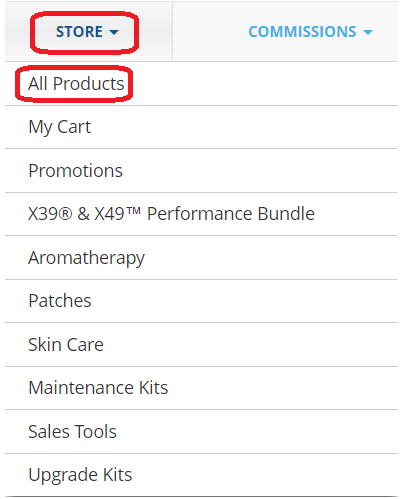
If you are a LifeWave Brand Partner, log in to your Back Office at www.lifewave.com, hover over the "Store" tab, and then click on the "All Products" button from the dropdown.
Step Two:
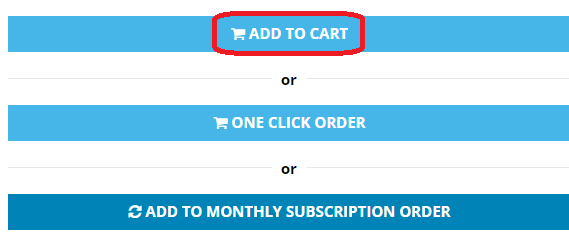
You can choose which product you would like to purchase by selecting the product in question and choosing from the options listed on the product page (being "Add to Cart" or "Once Click Wonder" or "Add to Monthly Subscription Order".)
Step Three:
After choosing your product, you can return to the "All Products" page from the dropdown and select other products.
Step Four:
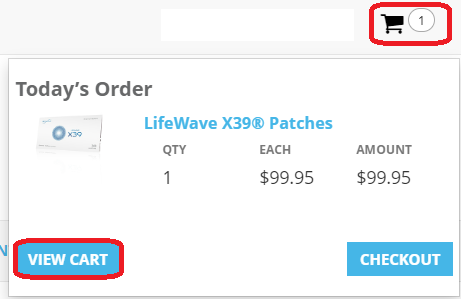
Once you've decided on the products you would like, click on the shopping cart in the top right-hand corner of the web page and click on the "View Cart" button.
Step Five:
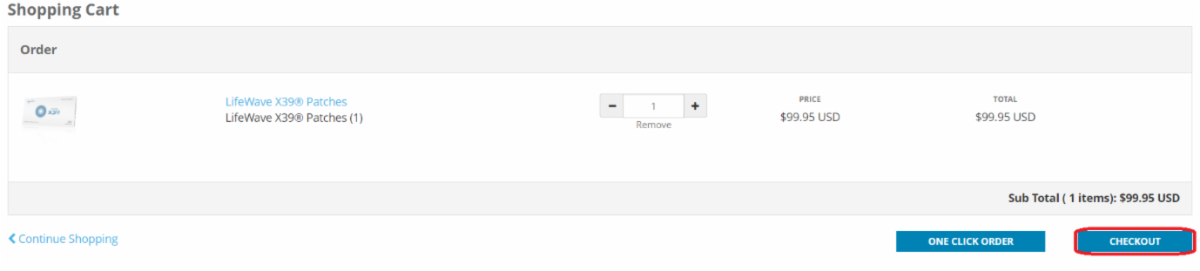
After reviewing your order, click on the "Checkout" button and follow the instructions to complete your order or monthly subscription order
Step One:
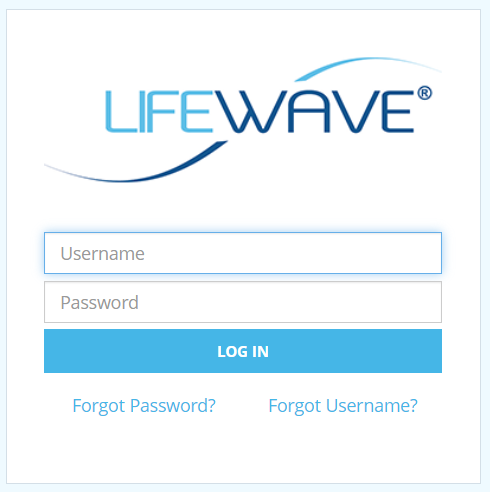
Log into back office
Step Two:
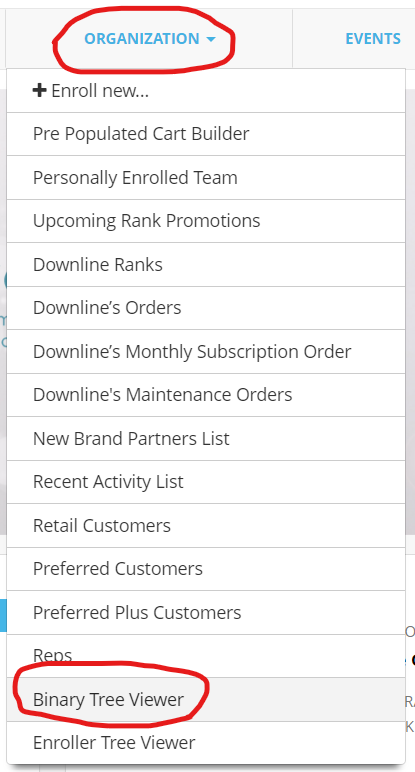
Select ORGANIZATION
Step Three:
Select BINARY TREE VIEWER
Step Four:
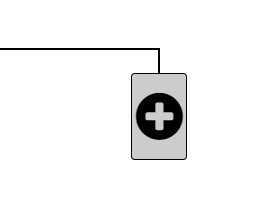
Select an open box (on an outer leg, NOT an inside leg) with a black plus sign
- Tip: goal is to be somewhat balanced. You need one Silver or higher “active - ordering 55 PV or $79.95 a month” on each leg to begin earning from points / binary.
- Product Intro Bonus is ALWAYS earned, no matter if you are “active” in the system. Provided you’ve made a purchase within the year, to stay in the system.
- To earn from binary system, points BV, you must have one active Silver or higher on left and right legs.
- Always build on the outer leg of those below you, referred to as the SHARED leg. This inspires teamwork to invectives people to build their other leg, in order to begin earning.
- Keep in mind, those below you must still sponsor one on left and right to earn from BV / points. Then, they would build their own inside leg to build their organization.
Step Five:
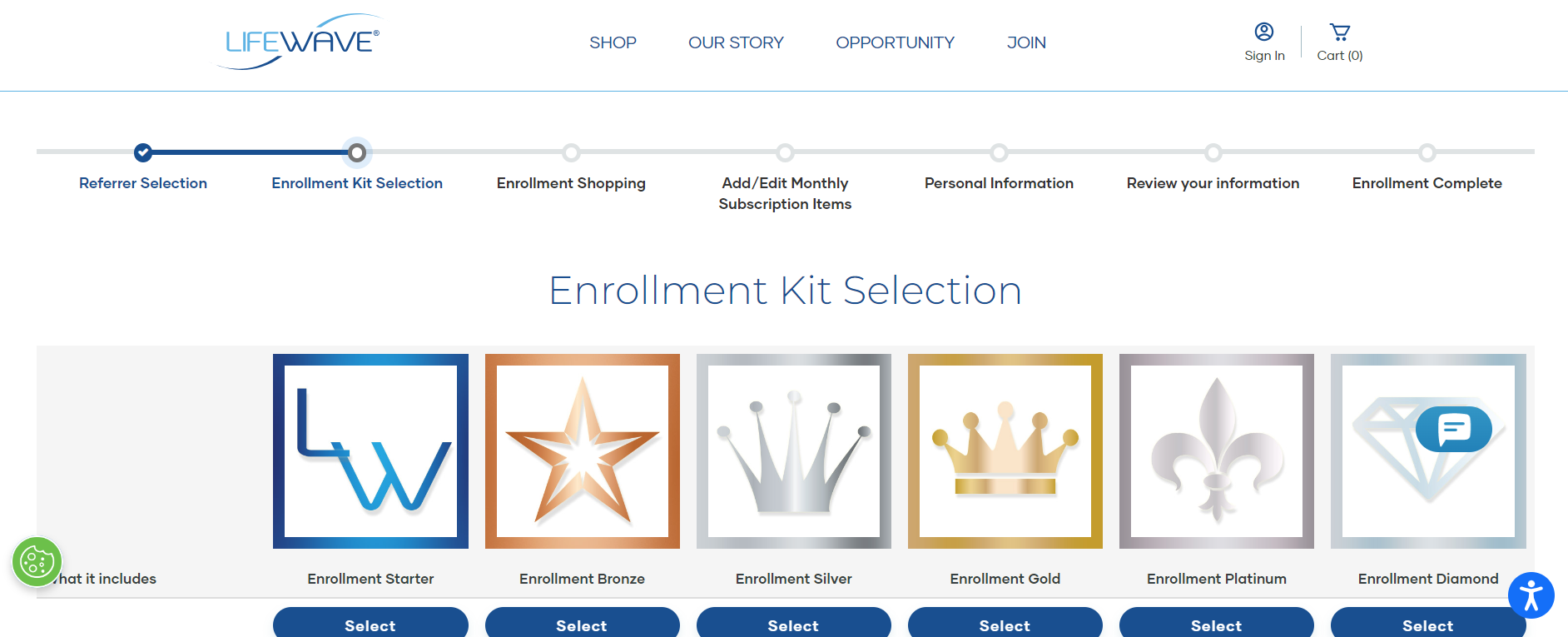
Select the pack of choice. Silver or Gold are best intro packs. But, if you have multiple people using patches, have a complicated health case or are a practitioner / retail outlet, then the Diamond kit is the best option, to get the lowest price. And there are great advantages if you’re looking to share / earn as a side business.
- You can always upgrade to the next level, and receive a credit for what kit you’ve already purchased.
- Or upgrade to the next level the following month. Silver to Gold is great, because you get one Bonus supportive pack of your choice, FREE. Higher level upgrades receive more free product as a bonus.
Step Six:
Activate monthly subscription with at least X39 to keep repair cells activating. You pick the ship date, 26 - 28 days later to allow for shipping time so you don’t run out.
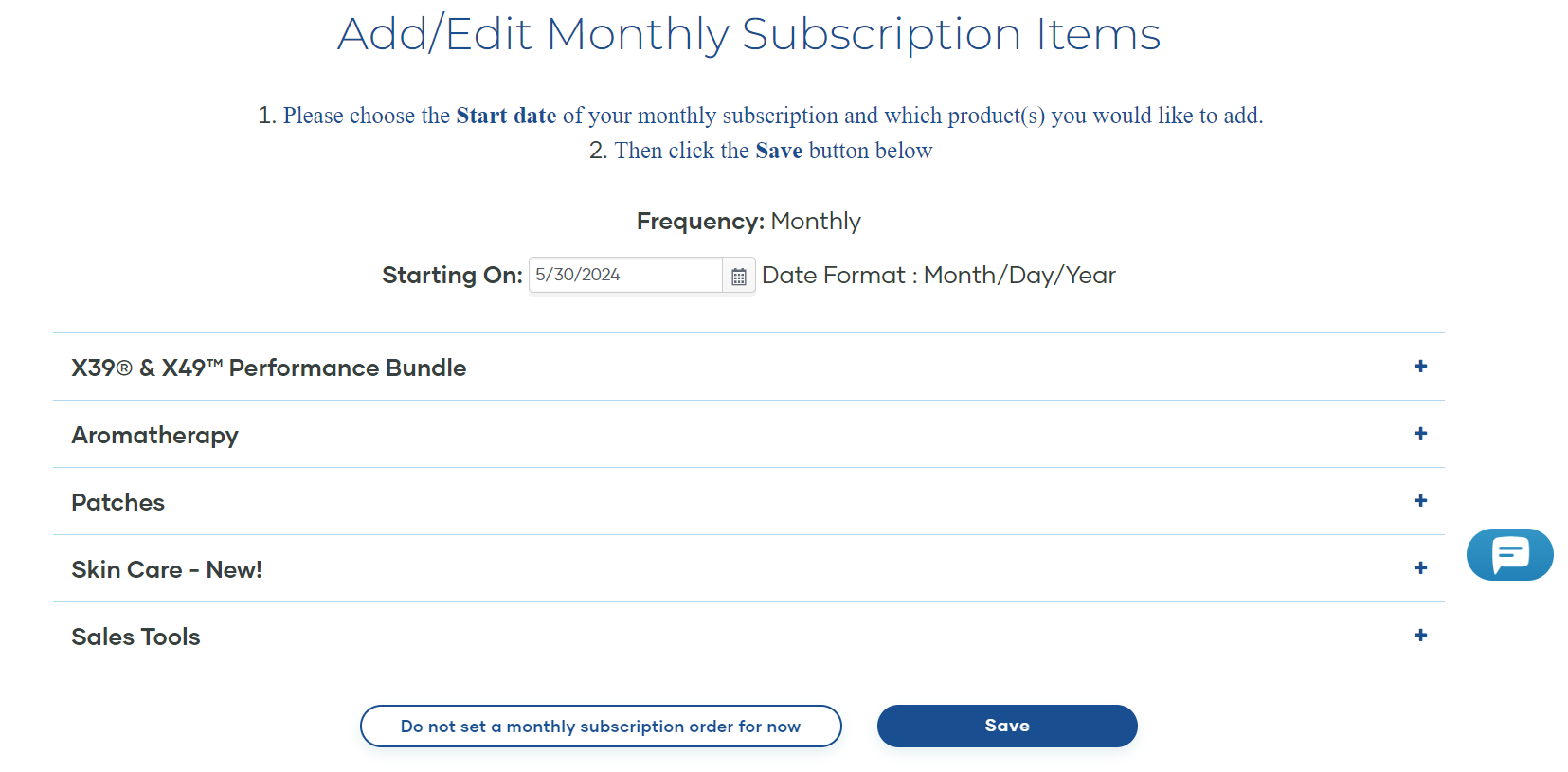
Go to LifeWave.com and log in
Once you log in to your back office, see "Real-Time Qualification" and scroll down
Click on any of the photos
to see them in full view!
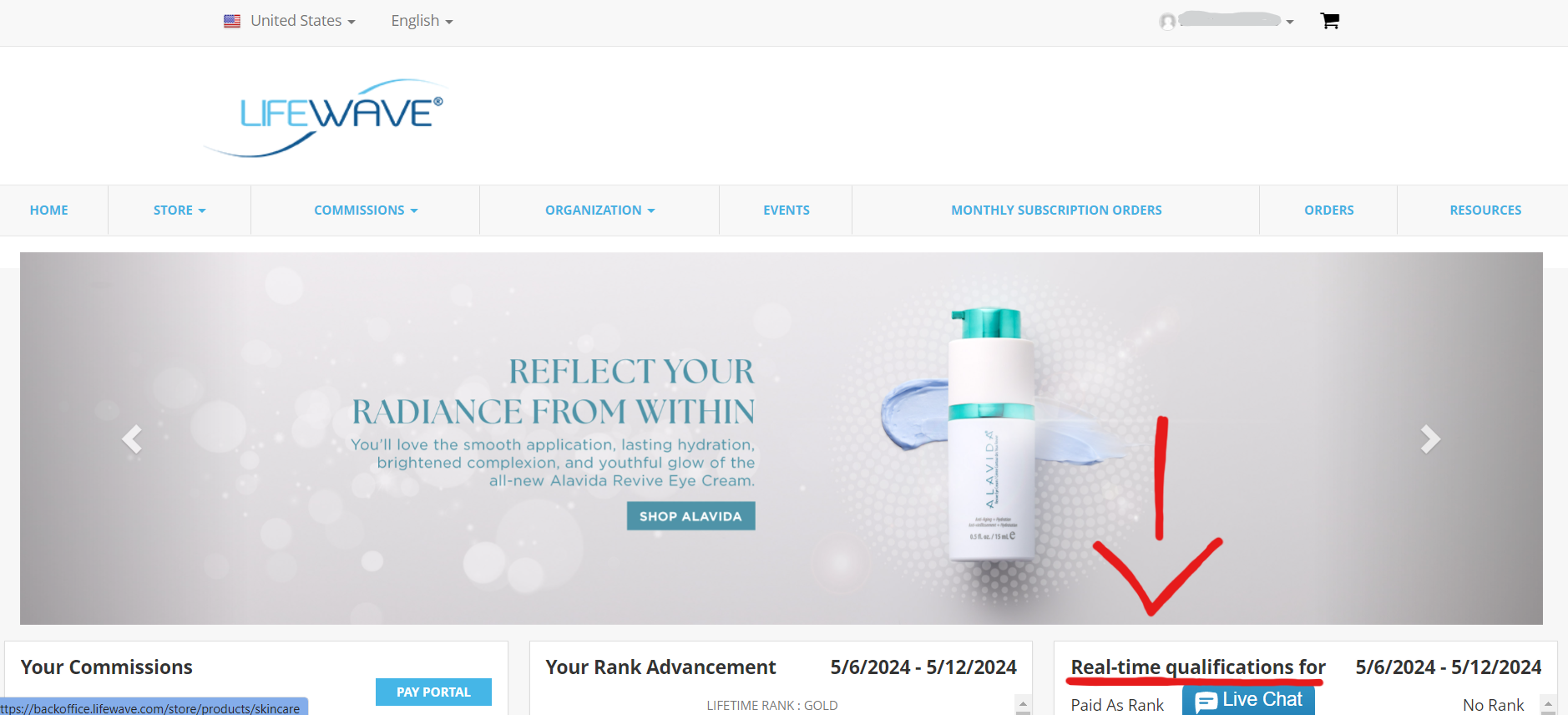
In the Real-Time Qualifications section, you will find:
- Paid As Rank; determines your maximum earnings for the commission cycle.
- Active Status; a green check means you are qualified for next commission cycle. If you see anything but a green check mark, scroll down in the Real-Time Qualifications section to use Active Key to understand the meaning.
- Period LV & RV (Left-leg Volume & Right-leg Volume); this is your points from the current week.
- Total LV & RV; this is your total points. As long as you stay active (the green check mark), your points are retained. Stay active by making a monthly purchase of 55+ PV (110+ PV if manager and above). Rolled over points expire after 52 weeks old, if not previously compensated for.
For more information about the points system, visit the section below:
HELPFUL FREE APPS
LifeWave InTouch App
To login, use your ID #as your user name and create a password.
Download through your preferred app store, or:

Telegram
Once downloaded you can be invited to our Evolve Stories, practitioners and training channels. There are amazing resources to learn from.
Download:
Our Favorite Channels:
Evolve Stories & Evolve Practitioners Group
PRODUCT RESOURCE WEBSITE
to go to the Product Resource Website
- Visit www.startx39now.com or click the "CLICK HERE" button
- Best website to share and learn from.
- You DON’T have to know it all. Just direct people to this website that does it ALL for you. The 1st 2 videos are only 5 min total and are very helpful. The photos and doctor testimonies are excellent to learn from.
BUSINESS BUILDER RESOURCE WEBSITE
to go to the Business Website
- Visit www.start333biz.com or click the "CLICK HERE" button
-
Access: click "Touch To Access The System"; User: start333biz / Password: 333biz
-
The best resource for learning is the Team Evolve Training Site with videos, forms, scripts, podcast schedule, comp plan, pay portal etc.
TRAINING TOOLS WITH TEAM EVOLVE
We have weekly podcasts and trainings! For patch overviews, trainings that address health issues, and trainings for business development
For Podcasts & Trainings
Meeting ID: 379 717 7845
Or Call In: + 1.669.900.6833
FAVORITE TRAININGS
- "Comprehensive Business Training with Top Leaders"
Saturdays 10 - 11 am PT. Product info, business building tips, comp. system & strategy, and more.
- "In The Know - with Peter Ngo"
Wednesdays 12:30-1:30pm PT, business building training, industry best practices, prospecting, personal development, and more
FAVORITE VIDEOS RESOURCES
The best way to learn is from doctor videos, even as you drive. Save these links in Notes on your phone for quick reference. See YouTube channel for full menu of videos from these experts.
PRINTABLE FLYERS
If you don't see an option to print, then right click and select "Save Image As", then print from your downloads folder or photos album
Sharing Resources
Tell your clients to fill this out before starting to patch
Business Forms
Our favorite version is attached
Product Flyers
FREQUENTLY ASKED QUESTIONS
LEARN MORE

How To Earn Money
Want to learn how the financial aspect of your business works? Here is page of resources to help you understand the compensation plan.

Navigating The Back Office Of Your New Website
Questions on how to input an order? Or need help to set up an autoship?
Click Here for videos to learn step by step
Click Here for a comprehensive guide with all the basics

Brand Partner Ranks
Click Here for an explanation of brand partner ranks
Click Here for how to grow from manager to senior director
Click Here for a step by step of how to find a personalized checklist of how you can advance to the next rank

How To Set Up Your Pay Portal
Need help setting up your pay portal? Click below for an in-depth walk through of how to set up your pay portal.
Click Here to watch a video

Want To Read More Studies?
Backed by more than 90 independent studies conducted at world-class universities and research institutions, our unmatched health technology improves and extends lives.
Click Here to read more studies
QUESTIONS?
For the quickest response, use the LIVE chat on the Lifewave website

Lifewave Customer Service
1-866-202-0065
(Monday - Friday, 8 am - 5 pm PST)
Or contact your brand partner
Something not working?
If any of the links aren't working right, or something goes wrong on the web page, please let us know at